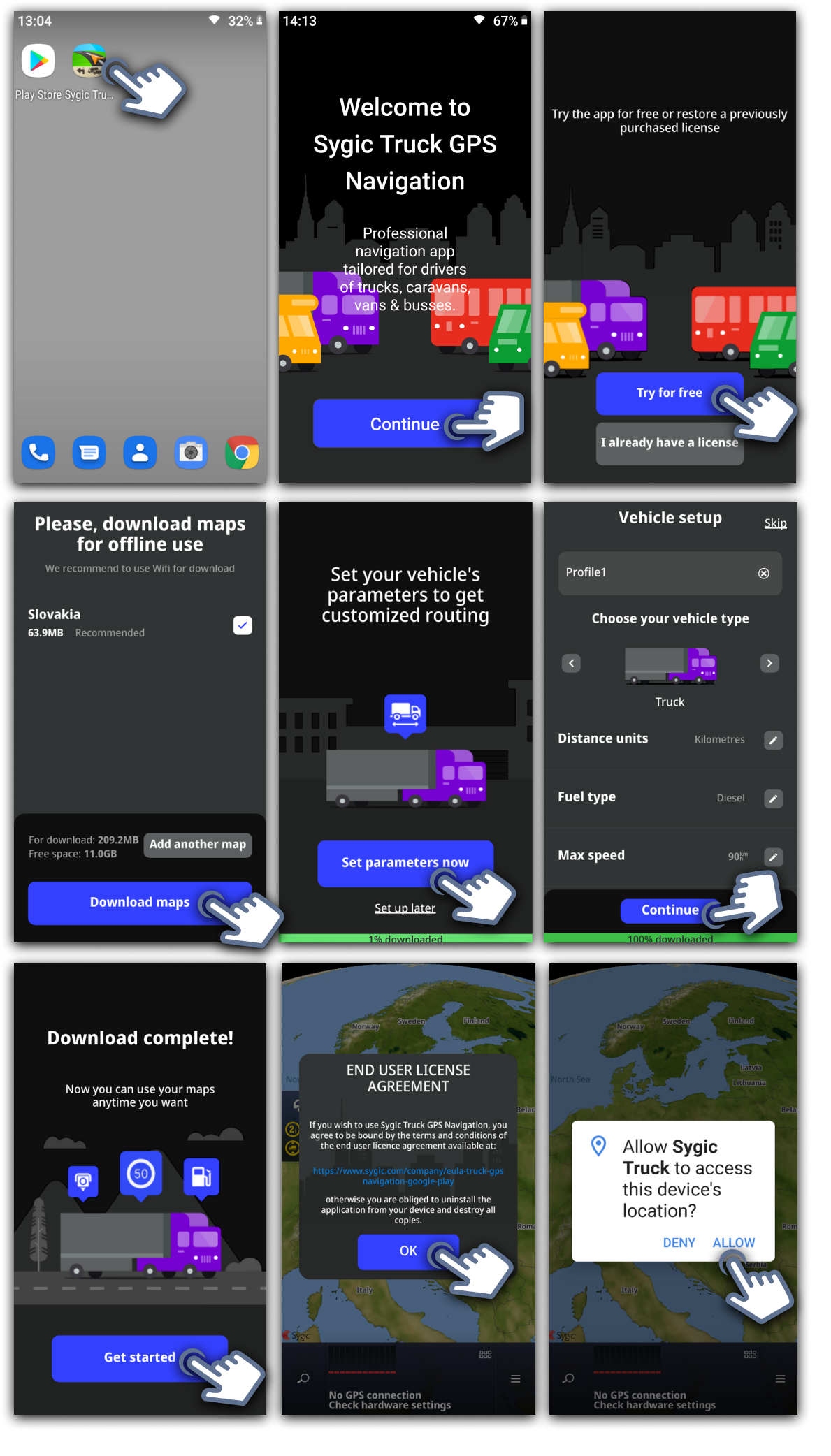
After a successful installation of Sygic GPS Truck & Caravan Navigation, the app is ready for the first launch:
Open Sygic GPS Truck & Caravan Navigation directly via the Sygic GPS Truck & Caravan Navigation icon or Google Play Store/ Apple App Store and tap Continue to the next page.
Choose whether you want to use internal storage or SD card.
If you have a license, tap on I already have a license (and activate your product). Otherwise, tap on Try for free.
Download your first map. You can download just the recommended one, or you can add another map/ maps you require, then continue on Download maps.
You can set your vehicle parameters until you wait for the map download. The app will calculate the route according to the vehicle parameters you selected.
After the map download is complete, you need to agree with the end user license and agreement if you want to use the app.
Then allow any required permissions for the app.
All done! The app is ready to be used.
Additional maps can be downloaded any time directly in Menu > Manage Maps.
The vehicle parameters can be changed in Menu > Settings > Vehicle profiles.